
Sub-issues and relations
Break an issue into smaller work and link dependencies.
Make a sub-issue
Open the parent issue and select Add sub-issue in its Sub-issues section. The composer carries the parent into the new issue. Enter a title and choose the properties that belong to the smaller task.
After you save, the parent lists its children by identifier and title. Select a child to open it. Use Load more sub-issues if the parent has more children than the first page shows.
Use a sub-issue when you need to track a task with its own status, estimate, comments, or time. Use a checklist in the description when each step belongs to one issue and needs no separate history.
Change a parent
Open the child issue and select Parent issue in its properties. Search by identifier or title, then choose the new parent. Clear the field to make the child a top-level issue.
The picker excludes a choice that would create a loop in the issue tree. If the issue belongs to a project, check the destination's project before you move it. A project move can also change the issue identifier according to your workspace preference.
Link related work
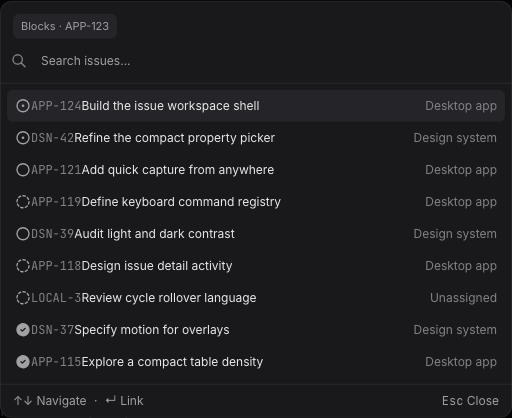
Open Relations on an issue. Choose one of these buttons, then search for the other issue:
| Relation | Use it when |
|---|---|
| Related to | The two issues share context without a dependency. |
| Blocks | This issue must progress before the other one can. |
| Blocked by | The other issue holds up this one. |
| Duplicates | Both issues describe the same work. |
Search by identifier or title. The picker can find issues beyond the page loaded in All issues. Select a result to create the relation. Select the related issue's identifier to open it; use the remove button on a relation row to unlink it.
A child also shows blocking relations from its ancestors with a via marker. This gives you the parent's dependency context without adding another direct relation to every child.
Archive or delete a parent
When you archive a parent with children, the confirmation gives you three choices:
- Archive all sub-issues applies the action to the issue tree.
- Make sub-issues top-level keeps the children open without a parent.
- Move sub-issues to another issue keeps them open under a parent you select.
The same choices appear when you permanently delete an archived parent, with Delete all sub-issues for the first choice. Check the affected count before you confirm. Deletion is permanent; archiving keeps an issue available for restore under Archives.
Read Triage and archive for the archive and restore screens.